Docker - Simplified Container Management for Security
8/14/2021
1. Useful Docker Commands
Organizing & Cleaning Up your host with Un-used containers or images will help in the long run, avoids confusion, wrong commits or overrides, basically eliminates the chances of human error, save spsace and time.
Find child containers:
docker inspect --format='ID {{.Id}} PAR {{.Parent}}' $(docker images -a -q)Delete a container or image tag:
docker rmi <container-id>
docker rmi <registry>:<tag> # Deletes the tag only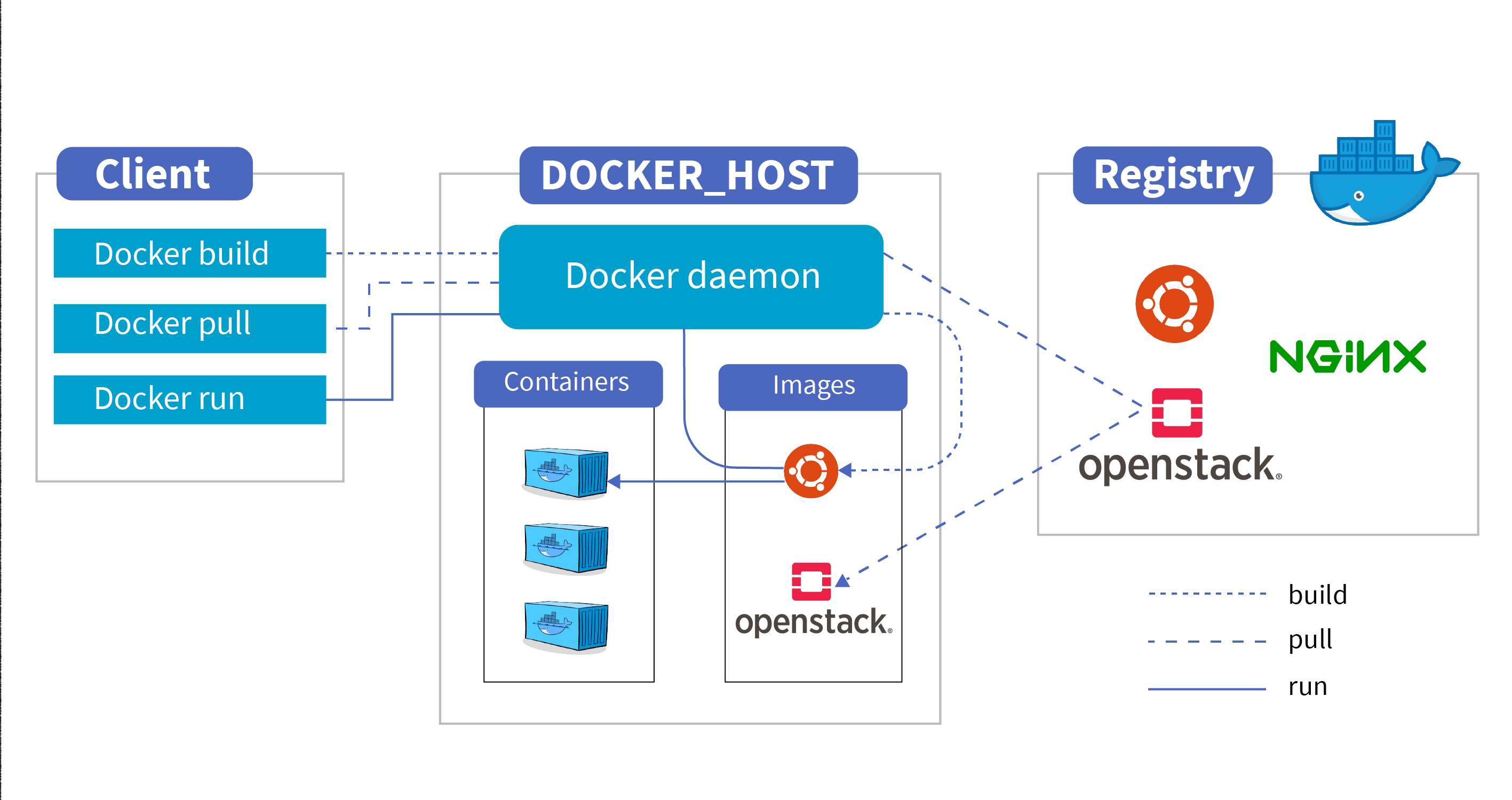
2. Upgrading Containers
For the container : Charlie
# Pulling the image from the Repo
docker pull ap-singapore-1.ocir.io/YourTenancyName/YourProjectName/Charlie:08April2021
# Starting the container in detached mode
docker run -itd ap-singapore-1.ocir.io/YourTenancyName/YourProjectName/Charlie:08April2021
# Getting into the Container Bash Terminal
docker exec -it f45a7796929f /bin/bash
# Inside container:
    bash-4.2# yum upgrade
# Committing the Upgrade or any changes that was performed
docker commit f45a7796929f ap-singapore-1.ocir.io/YourTenancyName/YourProjectName/Charlie:20July2021
# Saving it to a file
docker save ap-singapore-1.ocir.io/YourTenancyName/YourProjectName/Charlie:20July2021 > docker_Charlie_20July2021.tar
# You can also compress the above file using GZ
For the container : Dexter
# Pulling the image from the Repo
docker pull ap-singapore-1.ocir.io/YourTenancyName/YourProjectName/Dexter:08April2021
# Starting the container in detached mode
docker run -itd ap-singapore-1.ocir.io/YourTenancyName/YourProjectName/Dexter:08April2021
# Getting into the Container Bash Terminal
docker exec -it e823e6636d4c /bin/bash
# Inside container:
    bash-4.2# yum upgrade
# Committing the Upgrade or any changes that was performed
docker commit e823e6636d4c ap-singapore-1.ocir.io/YourTenancyName/YourProjectName/Dexter:20July2021
# Saving it to a file
docker save ap-singapore-1.ocir.io/YourTenancyName/YourProjectName/Dexter:20July2021 > docker_Dexter_20July2021.tar
# You can also compress the above file using GZ
For the container : Eddy
# Pulling the image from the Repo
docker pull ap-singapore-1.ocir.io/YourTenancyName/YourProjectName/Eddy:08April2021
# Starting the container in detached mode
docker run -itd ap-singapore-1.ocir.io/YourTenancyName/YourProjectName/Eddy:08April2021
# Getting into the Container Bash Terminal
docker exec -it 24a903f161e7 /bin/bash
# Inside container:
    bash-4.2# yum upgrade
# Committing the Upgrade or any changes that was performed
docker commit 24a903f161e7 ap-singapore-1.ocir.io/YourTenancyName/YourProjectName/Eddy:20July2021
# Saving it to a file
docker save ap-singapore-1.ocir.io/YourTenancyName/YourProjectName/Eddy:20July2021 > docker_Eddy_20July2021.tar
# You can also compress the above file using GZ
3. Scanning Images for Vulnerabilities
Option A: Docker Scout (Default Scanning Feature)
Docker Scout is Docker’s native security solution integrated directly into the Docker CLI.
1. Installation:
# Create the plugins directory if it does not already exist:
mkdir -p $HOME/.docker/cli-plugins

# Download the latest archive for your platform from the GitHub releases page.
# Extract the file and move the binary into place:
tar -xvzf docker-scout_*.tar.gz
mv docker-scout $HOME/.docker/cli-plugins/

# Grant execution rights to the plugin:
chmod +x $HOME/.docker/cli-plugins/docker-scout
2. Usage:
# Analyzing an image: Run the scan directly in your terminal to see a summary of flaws
docker scout quickview <image_name>:<tag>

# List all vulnerabilities: See a detailed breakdown of specific CVEs
docker scout cves <image_name>:<tag>

# Ask Docker Scout for recommendations on cleaner or updated base images
docker scout recommendations <image_name>:<tag>
Option B: Aqua Security’s Trivy (Third Party)
You do not even need to install it locally; you can run it via Docker:
# Scan a local image:
docker run --rm -v /var/run/docker.sock:/var/run/docker.sock aquasec/trivy image <image_name>:<tag>

# Filter results by severity: Target only the issues that truly matter (e.g., CRITICAL)
docker run --rm -v /var/run/docker.sock:/var/run/docker.sock aquasec/trivy image --severity HIGH,CRITICAL <image_name>:<tag>
Sample Output
alpine:3.14 (alpine 3.14.0)

Total: 2 (UNKNOWN: 0, LOW: 0, MEDIUM: 1, HIGH: 0, CRITICAL: 1)

┌─────────┬────────────────┬──────────┬───────────────┬───────────────────┬─────────────────────────────────────────────────────────┐
│ Library │ Vulnerability  │ Severity │ Installed Ver │    Fixed Ver      │                          Title                          │
├─────────┼────────────────┼──────────┼───────────────┼───────────────────┼─────────────────────────────────────────────────────────┤
│ libcrypto1.1 │ CVE-2022-0778  │ CRITICAL │ 1.1.1l-r0     │ 1.1.1l-r1         │ openssl: Infinite loop in BN_mod_sqrt()                 │
│         │                │          │               │                   │                                                         │
├─────────┼────────────────┼──────────┼───────────────┼───────────────────┼─────────────────────────────────────────────────────────┤
│ ssl_client   │ CVE-2022-22747 │ MEDIUM   │ 1.33.1-r2     │ 1.33.1-r3         │ busybox: Buffer overflow in terminal handling           │
│         │                │          │               │                   │                                                         │
└─────────┴────────────────┴──────────┴───────────────┴───────────────────┴─────────────────────────────────────────────────────────┘

# If you configure your pipeline to export data using below command, the scanner will output a structured JSON output

trivy image --format json -o result.json
4. Re-running Scans with Fixes
After finding a vulnerability, apply the fix to the container.
Charlie:
docker run -itd ap-singapore-1.ocir.io/YourTenancyName/YourProjectName/Charlie:20July2021
docker exec -it 88dd361692d7 /bin/bash
docker cp rsyslog-package.rpm 88dd361692d7:/tmp/
docker commit 88dd361692d7 ap-singapore-1.ocir.io/YourTenancyName/YourProjectName/Charlie:04082021
docker save ap-singapore-1.ocir.io/YourTenancyName/YourProjectName/Charlie:04082021 > docker_Charlie_04082021.tar
Dexter:
# RUNNING ALREADY EXISTING IMAGE
docker run -itd ap-singapore-1.ocir.io/YourTenancyName/YourProjectName/Dexter:20July2021
docker exec -it e823e6636d4c /bin/bash
docker cp rsyslog-package.rpm e823e6636d4c:/tmp/
# RENAMING THE UPGRADED IMAGE
docker commit e823e6636d4c ap-singapore-1.ocir.io/YourTenancyName/YourProjectName/Dexter:06082021
docker save ap-singapore-1.ocir.io/YourTenancyName/YourProjectName/Dexter:06082021 > docker_Dexter_06082021.tar
Eddy:
docker run -itd ap-singapore-1.ocir.io/YourTenancyName/YourProjectName/Eddy:20July2021
docker exec -it 24a903f161e7 /bin/bash
docker cp rsyslog-package.rpm 24a903f161e7:/tmp/
docker commit 24a903f161e7 ap-singapore-1.ocir.io/YourTenancyName/YourProjectName/Eddy:06082021
docker save ap-singapore-1.ocir.io/YourTenancyName/YourProjectName/Eddy:06082021 > docker_Eddy_06082021.tar
5. Uploading into the Registry (Final Copy)
After the above results are clean and vulnerabilities are fixed.
1) Eddy:
docker tag ap-singapore-1.ocir.io/YourTenancyName/YourProjectName/Eddy:06082021 ap-singapore-1.ocir.io/YourTenancyName/YourProjectName/Eddy:06aug2021
docker push ap-singapore-1.ocir.io/YourTenancyName/YourProjectName/Eddy:06aug2021
2) Charlie:
docker tag ap-singapore-1.ocir.io/YourTenancyName/YourProjectName/Charlie:04082021 ap-singapore-1.ocir.io/YourTenancyName/YourProjectName/Charlie:06aug2021
docker push ap-singapore-1.ocir.io/YourTenancyName/YourProjectName/Charlie:06aug2021
3) Dexter:
docker tag ap-singapore-1.ocir.io/YourTenancyName/YourProjectName/Dexter:04082021 ap-singapore-1.ocir.io/YourTenancyName/YourProjectName/Dexter:06aug2021
docker push ap-singapore-1.ocir.io/YourTenancyName/YourProjectName/Dexter:06aug2021